
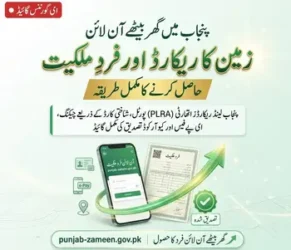
How to Get Land Ownership Record Online in Punjab – PLRA Portal and App Guide. check, download, and verify your digital Fard Malkiat (land ownership record) online in Punjab via Punjab Land Records Authority (PLRA) portal (punjab-zameen.gov.pk) and mobile app.
Executive Summary
- 24/7 Digital Land Record Access: Citizens across Punjab can check, download, and verify their official land ownership record (Fard Malkiat / Record of Rights) online without visiting traditional Patwarkhanas or standing in queues at Arazi Record Centers (ARCs).
- Official PLRA Digital Channels: Online services are operated by the Punjab Land Records Authority (PLRA) through the official web portal (
punjab-zameen.gov.pk/onlinefard) and the official PLRA Digital Gardawari / Punjab Zameen Mobile App. - Mandatory Verification Credentials: To fetch your digital Fard, you need your 13-digit NADRA CNIC (or NICOP/POC for Overseas Pakistanis), an active mobile number for SMS OTP verification, and your District, Tehsil, and Mauza (Revenue Estate) details, plus your Khewat / Khata Number or Khasra Number if searching by property parcel.
- Instant Fee Payment & QR Verification: Government Fard fees are paid digitally via e-Pay Punjab using a 17-digit PSID code (via JazzCash, EasyPaisa, ATM, or mobile banking), generating an authentic QR-coded Digital Fard verifiable online for personal record or property sale/transfer (Intiqal).
How to Get Your Land Ownership Record Online in Punjab
Through the Computerization of Land Records initiative, the Punjab Land Records Authority (PLRA) has digitized millions of rural and urban-adjacent Mauzas across all districts of Punjab, replacing manual Patwari registers (Jamabandi / Register Haqdaran-e-Zameen) with centralized biometric and cryptographic databases.
Types of Online Fard Available in Punjab
Before applying online, select the exact category of Fard required for your legal or personal purpose:
- Fard Bra-e-Record (Personal Record / Information Copy): Used by landowners to verify their current shareholding, total land area (Kanal, Marla, Sarsai or Acre, Kanal, Marla), and Khewat/Khasra entries.
- Fard Bra-e-Baie (Sale / Transfer Purpose): Issued specifically for executing a property sale deed (Registry) or mutation (Intiqal), temporarily locking the specific land share to prevent double-selling.
- Fard Bra-e-Hiba / Tamleek (Gift / Family Transfer): Used when transferring agricultural or residential land to legal heirs or blood relatives.
- Fard Bra-e-Rahn / Guarantee (Bank Mortgage / Loan): Issued when pledging land as collateral for agricultural or commercial bank financing.
Prerequisites & Required Information to Check Land Records Online
Keep the following details ready before logging into the PLRA portal or mobile app:
1. Personal Identification & Contact Details
- 13-Digit CNIC Number (for Pakistani residents) or NICOP / POC Number (for Overseas Pakistanis).
- Active Mobile Number (registered in Pakistan for instant SMS OTP verification; Overseas Pakistanis can verify via email/international portals where enabled).
2. Revenue & Property Location Details
- District (Zila): e.g., Lahore, Rawalpindi, Faisalabad, Multan, Gujranwala, Sialkot, Bahawalpur, etc.
- Tehsil (Taluka): The administrative subdivision where the land is situated.
- Mauza (Revenue Estate / Village / Chak): The exact revenue estate name recorded in land revenue books.
- Khewat / Khata Number or Owner Name: Searching by CNIC automatically lists all Khewats linked to your identity card within that Mauza; alternatively, you can search using your name, father’s/husband’s name, or Khasra (survey) number.
Step-by-Step Guide: How to Get Your Land Ownership Record (Fard) Online in Punjab
Follow this complete six-step procedure to apply for and download your official PLRA Digital Fard from home:
Step 1: Access the Official PLRA Online Fard Portal
- Open your web browser and navigate to the official Punjab Land Records Authority portal at
https://www.punjab-zameen.gov.pk/. - Alternatively, download the official Punjab Zameen / PLRA mobile app from the Google Play Store or Apple App Store.
Step 2: Verify Your Identity via CNIC & SMS OTP
- Click on “Online Fard” (آن لائن فرد).
- Enter your 13-digit CNIC number (without dashes) and your active mobile phone number.
- Enter the One-Time Password (OTP) sent via SMS to your mobile phone to authenticate your session.
Step 3: Select Land Location (District, Tehsil & Mauza)
- Choose your District, Tehsil, and Mauza (Revenue Estate) from the dropdown menus.
- Specify the Purpose of Fard (e.g., Personal Record, Sale/Baie, or Bank Loan/Mortgage).
Step 4: Locate Your Land Record (Khewat / Khata Selection)
- The system will display matching landowner records linked to your CNIC or entered name inside that Mauza.
- Select your exact Khewat / Khata Number, review your ownership share (Hissa), and specify the required area (Kanal / Marla) for which you need the Fard issued.
Step 5: Generate PSID & Pay Fee via e-Pay Punjab
- Once you confirm your request, the portal generates a unique 17-digit Payment Slip ID (PSID) along with the official government fee breakdown (standard base fee plus per-page charges).
- Pay the PSID instantly from your phone using:
- Mobile Wallets: JazzCash or EasyPaisa (Government Payments -> e-Pay Punjab / PLRA).
- Banking Apps / ATMs / 1Link: Any Pakistani commercial bank mobile app or ATM using the 1Bill / e-Pay Punjab option.
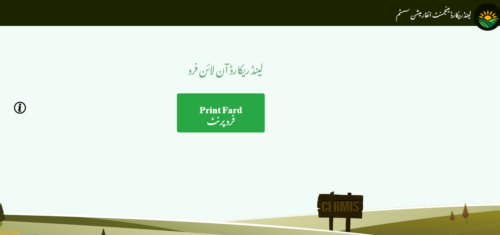
Step 6: Download & Print Your QR-Coded Digital Fard
- Immediately after payment confirmation, return to the portal’s “Download / Print Fard” tab and enter your CNIC and tracking/PSID number.
- Download the official PDF Digital Fard featuring a secure PLRA QR Code and unique barcode.
- (Optional) If you need a stamped physical copy for court or bank submission, you can also collect it from any Arazi Record Center (ARC), e-Khidmat Markaz, or designated NADRA e-Sahulat franchise using your tracking ID.
🔍 How to Verify a Digital Fard Online (Anti-Fraud Check for Property Buyers)
Before paying advance money (Bayana) on any plot or agricultural land in Punjab, buyers should verify the seller’s Fard in under 30 seconds:
- Scan the QR Code: Point your smartphone camera at the QR code printed on the top corner of the Fard—it redirects directly to PLRA’s verification server showing the live database record.
- Manual Portal Verification: Visit
punjab-zameen.gov.pk, click “Fard Verification” (فرد کی تصدیق), and enter the Fard Serial / Tracking Number and CNIC to confirm that the land is free from court stays (Stay Order), bank liens, or prior transfers.
Special Facility for Overseas Pakistanis (PLRA Overseas Portal)
Overseas Pakistanis holding a valid NICOP or POC can access land records, apply for Digital Fard, and initiate property transfers without traveling to Pakistan through PLRA’s dedicated Overseas Services desk and designated Pakistani embassies/consulates (including biometric verification facilitation in the UK, UAE, Saudi Arabia, and the US).
PLRA Online Fard Services: Quick Reference Table
| Service / Feature | Official Details |
| Governing Authority | Punjab Land Records Authority (PLRA), Government of Punjab |
| Official Web Portals | punjab-zameen.gov.pk |
| Primary Document Issued | Digital Fard Malkiat (Record of Rights / Jamabandi Extract) |
| Mandatory ID Requirement | 13-digit NADRA CNIC (Residents) / NICOP or POC (Overseas Pakistanis) |
| Fee Payment System | e-Pay Punjab 17-digit PSID (JazzCash, EasyPaisa, 1Link Banking Apps, ATMs) |
| Security & Authenticity | Cryptographic QR Code + Unique Tracking ID (verifiable online 24/7) |
| Official Helpline | PLRA Toll-Free / UAN: 042-111-22-22-77 |
Frequently Asked Questions (FAQ) – How to Get Land Ownership Record Online in Punjab – PLRA Portal and App Guide
Here are the FAQs regarding How to Get Land Ownership Record Online in Punjab – PLRA Portal and App Guide:
Q1: Can I check my land record in Punjab using only my CNIC number?
Ans. Yes, if your CNIC is already linked to your land shareholding (Khewat) in PLRA’s computerized database, entering your CNIC, District, Tehsil, and Mauza on onlinefard.punjab-zameen.gov.pk will automatically retrieve your ownership records.
Q2: What if my Mauza is still manual (non-computerized) or my CNIC is not linked?
Ans. If your Mauza has not yet been digitized or your CNIC is missing from the Jamabandi record, visit your nearest Arazi Record Center (ARC) or Qanoongo / Patwar Circle with your original CNIC and old ownership documents to complete CNIC seeding (اندراج شناختی کارڈ).
Q3: Is a printed online Digital Fard legally valid in Punjab?
Ans. Yes, a Digital Fard downloaded from onlinefard.punjab-zameen.gov.pk carries an official PLRA QR code and digital signature, making it legally verifiable for personal records, banking, and property verification.
Q4: How can I verify if a seller’s Fard is genuine before buying land in Punjab?
Ans. Use the “Fard Verification” tool on punjab-zameen.gov.pk or scan the QR code on the Fard document to confirm the owner’s name, exact Marla/Kanal share, and ensure there is no legal stay or mortgage restriction.
The Bottom Line
Digitizing land ownership records through the Punjab Land Records Authority (PLRA) has eliminated decades of dependency on middlemen and manual registers. By logging into onlinefard.punjab-zameen.gov.pk, authenticating via CNIC and SMS OTP, paying the official e-Pay Punjab PSID, and downloading a QR-coded Digital Fard, landowners and buyers across Punjab can verify property rights transparently in minutes.
Disclaimer/Note: The information above might not be 100% correct. Please verify from your own sources. We will not be responsible for any kind of loss or liability due to our content.
For more news, please visit Munafa Marketing.